Website Support

Your website is supported by Ivrnet, a fellow Harris business unit.

For general questions, content updates, new website projects, or urgent issues such as a site outage, email the Ivrnet Support team. Please click on the Website Support Request button below to send an email.

What to expect

  • Ivrnet aims to respond to all requests within one business day.
  • Support is available by email during regular business hours.

Tips for a faster response

  • Include your organization name and website address
  • Describe the change or issue and attach screenshots or files if you have them.
  • If your site is down, put “URGENT” in the subject line.

You can still reach out to MACC at any time by contacting your Client Solutions Manager.

 

Delinquents

No Penalty Option for Delinquents

A new “No Penalty” option is now available for delinquent accounts, so users have the ability to send a late notice to an account, but keep the account from getting a penalty. An Expire Date, Alert, and reports are available for accounts flagged No Penalty.

A No Penalty check box was added to the Credit Node of the Service Order, with a corresponding Expire Date drop-down calendar. When checked, the account can receive a delinquent notice, but will not get a late fee during the Penalties process. The Expire Date can be set to limit the amount of time the account is exempt from penalties.

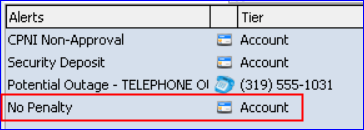
A No Penalty Alert is available for both Inquiry and Payments at Maintenance | Common | Alerts, and will display in the Alerts window for any accounts flagged No Penalty.

The Non-Zero Balance Report found in the report’s menu of the Delinquent process, contains a new No Penalty column to aid in identifying No Penalty accounts.

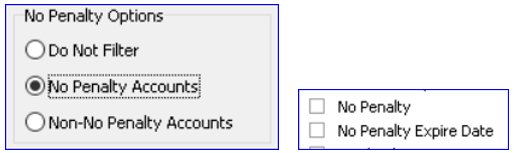
The Credit Attributes report, and the Grid Report – Account can be used to discover accounts flagged as No Penalty. The Credit Attributes report has a new group box for No Penalty Options, and the Grid Report – Account includes No Penalty, and No Penalty Expire Date selections.